Home / Compare / Splid
App comparison

Tabb vs Splid

Splid is the closest app to Tabb in spirit: no account, no ads, works offline. The differences are in pricing model, platforms, and the extras. Here is the honest head-to-head.

By the Tabb teamJune 11, 20267 min read
Tabb app icon Tabb Split bills with friends, no signup
VS
Splid app icon Splid The closest no-signup, offline rival to Tabb

Tabb and Splid share the same core idea: split bills without making anyone sign up. The real differences are Splid's one-time price and offline-first design versus Tabb's receipt OCR, analytics, and a polished iPhone experience.

🟢 Choose Tabb

You want receipt OCR, spending analytics, and a polished iPhone experience, and you are fine with a subscription.

🔵 Choose Splid

You want a one-time purchase instead of a subscription, full offline use, Android support, and 150+ currencies, with a simpler feature set.

Tabb vs Splid at a glance

FeatureTabbSplid
Account / signupNoneNone
PlatformsiPhoneiOS, Android
AdsNoneNone
Pricing modelSubscription ($4.99 / wk or $79.99 / yr)One-time purchase (around $3.99 to $4.99)
Offline useBest with a connectionFully offline
CurrenciesMulti-currency150+ with auto-conversion
Receipt scanning (OCR)Yes (Pro)Not available
Spending analyticsYes (Pro)Not a focus
Groups on free tier1 group1 group (more via upgrade)
Data exportYes (Pro)PDF and Excel (Plus)

If you have been looking for a bill splitter that does not force everyone to make an account, you have probably found both Tabb and Splid. They are the two clearest examples of the no-signup philosophy, and honestly, you would be well served by either. This comparison is about the details that separate them, told straight.

Same philosophy, different business model

Both apps let you create a group and start splitting immediately, with no email, no password, and no ads. Where they diverge is how you pay for the extras. Splid uses a one-time purchase: pay once for Splid Plus and you unlock unlimited groups and PDF or Excel export forever, with no recurring charge. Tabb uses a subscription for Pro. If you only need the upgrade and want to pay once, Splid's model is friendlier on the wallet over time. If you value what Tabb's Pro unlocks, the subscription buys features Splid does not offer.

🧭

The honest take: Splid is the better pure-value pick for travelers who want offline use, lots of currencies, and a one-time price. Tabb is the better pick if receipt OCR, analytics, and a polished iPhone experience matter to you.

See them side by side

Tabb icon Tabb

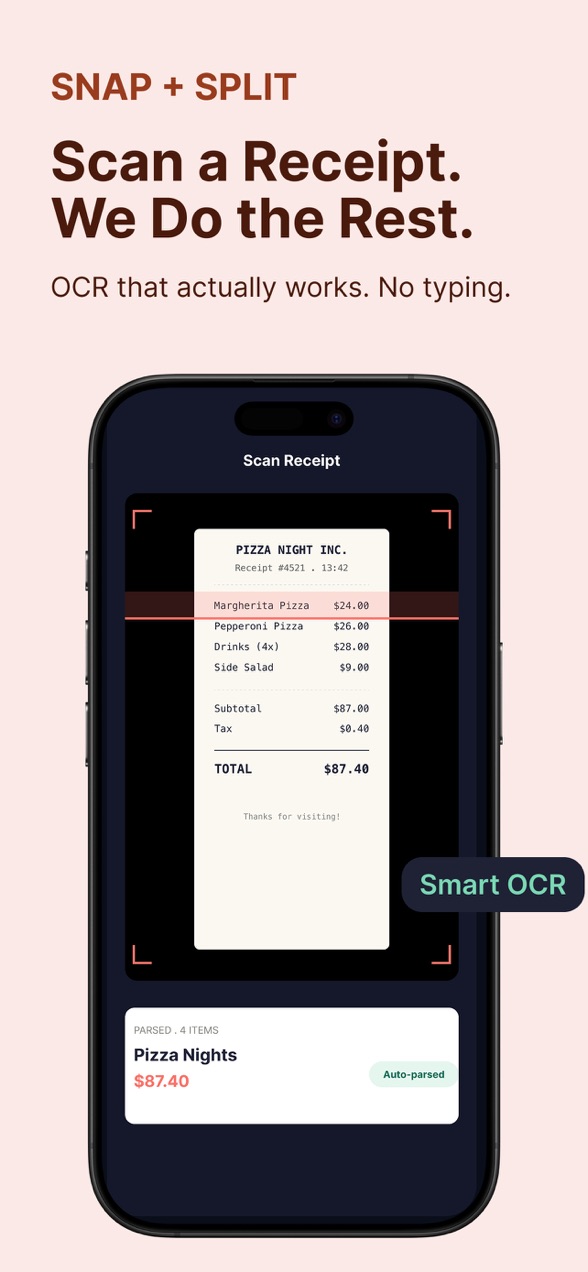
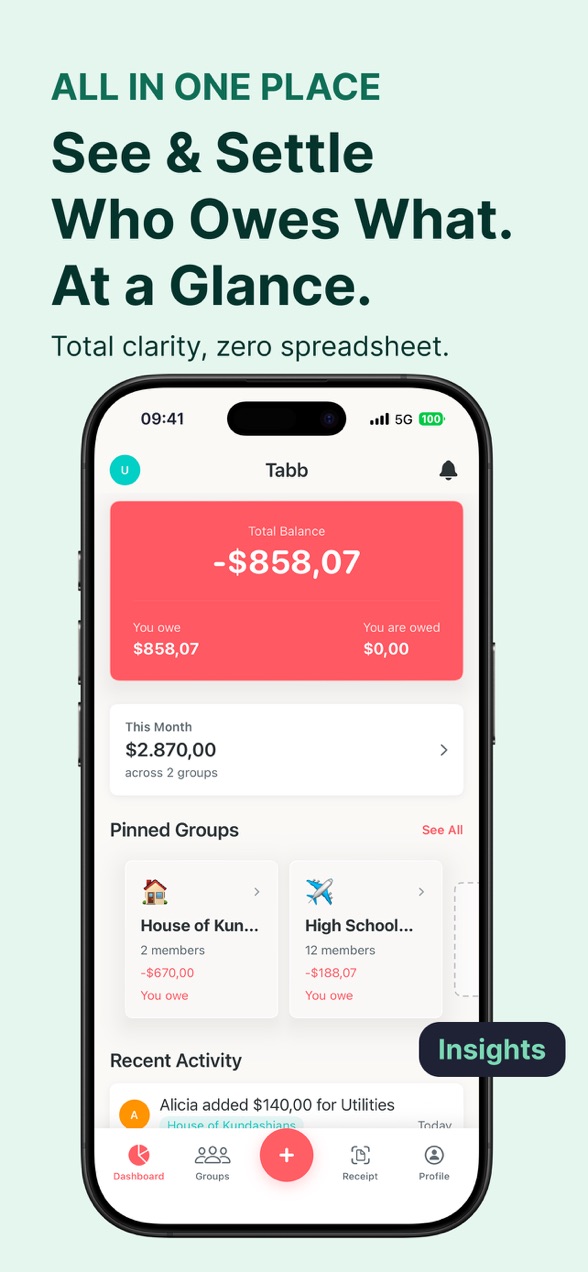
Tabb receipt scanning screenTabb spending analytics screen

Receipt OCR and analytics on iPhone.

Splid icon Splid

Splid app icon

No account, fully offline, 150+ currencies, one-time purchase.

Pricing

Splid's one-time purchase is the standout here, and it is genuinely cheaper for anyone who keeps an app for more than a few months. Tabb's subscription is only worth it if you use the Pro features.

Tabb Tabb Pro
Free: one group, unlimited expenses, no ads
$4.99 / week or $79.99 / year
  • Unlimited groups
  • Receipt scanning (OCR)
  • Spending analytics
  • Data export
Splid Splid Plus
Free: one group, no ads, fully offline
One-time, around $3.99 to $4.99
  • Unlimited groups
  • PDF and Excel export
  • 150+ currencies with auto-conversion
  • No subscription, pay once

Splid's exact price varies a little by region and SKU, so treat the figure as a current ballpark for the one-time unlock.

Where each one is stronger

🟢 Tabb is better when

  • You want receipt scanning with OCR
  • You want spending analytics
  • You want everything in one clean iPhone app
  • A polished, native iPhone experience matters

🔵 Splid is better when

  • You prefer a one-time purchase over a subscription
  • You travel and need full offline support
  • You deal with many currencies
  • Your group includes Android users

Who should use which

This is the rare comparison where both apps stay true to the same promise, so you can pick on details without losing the no-signup benefit. Go with Splid if you want offline travel use, lots of currencies, Android support, and a one-time price. Go with Tabb if receipt OCR, analytics, and the polished iPhone experience is worth a subscription to you. Either way you skip the account, which is the whole point. See how the wider field stacks up in our alternatives roundup, or start with Tabb right now.


All comparisons

Tabb vs Splid: FAQ

Do Tabb and Splid both work without an account?

Yes. Both let you create a group and split bills with no signup, no email, and no password, for you or the people you split with. This shared no-account approach is the main thing they have in common.

Is Splid a one-time purchase or a subscription?

Splid uses a one-time purchase. Splid Plus unlocks unlimited groups and PDF or Excel export for a single payment, with no recurring charge. Tabb Pro is a subscription at $4.99 per week or $79.99 per year.

Does Tabb work offline like Splid?

Splid is designed to work fully offline, which is ideal for travel with no connection. Tabb works best with a connection for real-time balances. If offline use is essential, Splid has the edge.

What does Tabb offer that Splid does not?

Tabb Pro adds receipt scanning with OCR and spending analytics, with a polished native iPhone experience. Splid focuses on a simpler, offline-first splitting experience.

Which supports more currencies?

Splid supports 150+ currencies with automatic conversion, a strength for international travel. Tabb is multi-currency as well, but Splid's range is a particular selling point.

Tabb

Try the no-signup way to split

Create a group, add expenses as they happen, and settle up in seconds. Free to start, no account.

Download on theApp Store